
Reddit is a massive platform filled with communities, discussions, and endless content. But sometimes, you may decide it’s time to step away. Whether you’re concerned about privacy, reducing screen time, or simply cleaning up your online presence, knowing how to delete Reddit account properly is essential.
In this guide, you’ll learn exactly how to delete your Reddit account on desktop, mobile, iPhone, and through the app — plus important things to know before you permanently deactivate it.
What Happens When You Delete Your Reddit Account?
Before diving into the steps, it’s important to understand the consequences:
- Your Reddit account deletion is permanent
- You cannot reactivate the account later
- Username becomes unavailable forever
- Posts and comments remain but show as [deleted]
- Reddit Premium is not automatically canceled (you must cancel separately)
If you’re sure, let’s move forward.
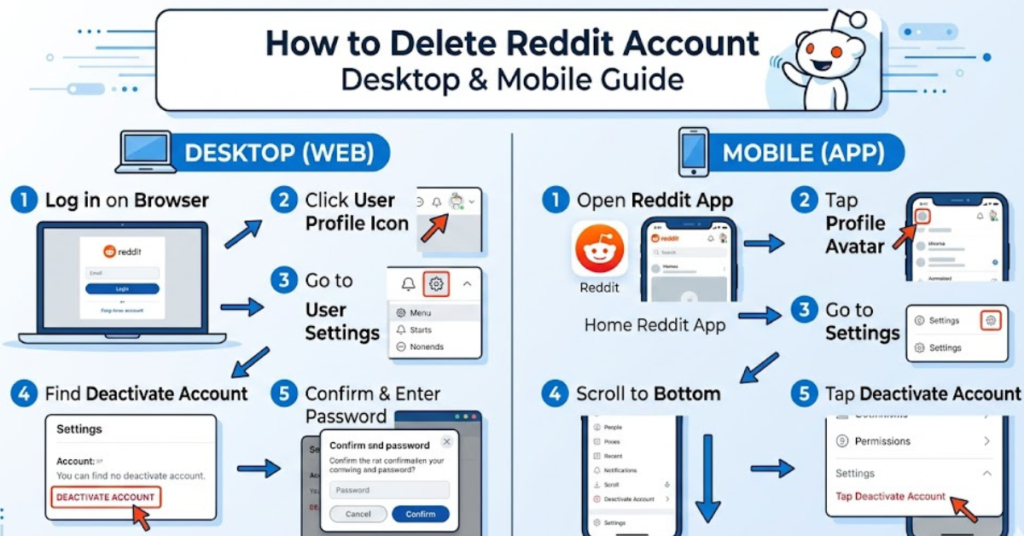
How to Delete Reddit Account on Desktop
Deleting your Reddit account is easiest from a browser. Follow these steps:
- Log in to your Reddit account
- Click your profile icon (top-right corner)
- Select User Settings
- Scroll down to the Advanced section
- Click Delete Account
- Enter your username and password
- (Optional) Provide feedback
- Check the confirmation box
- Click Delete
- Confirm again
That’s it — your Reddit account will be permanently deleted.
How to Delete Reddit Account on Mobile Android & iPhone
Many users search for how to delete reddit account on mobile, but here’s the key detail: you cannot delete your account directly from the Reddit app. Instead, you must use a mobile browser.
Steps to Delete Reddit Account on Phone
- Open Chrome, Safari, or any mobile browser
- Go to reddit.com
- Log in to your account
- Tap the menu icon (☰)
- Select Settings
- Scroll to Delete Account
- Enter login details
- Confirm deletion
This method works for both Android and iPhone.
How to Delete Reddit Account on App
If you’re wondering how to delete reddit account on app, here’s the truth:
- Reddit app does not currently allow account deletion
- You must use a mobile browser or desktop
- The app may redirect you to a web page
This is why many users think the option is missing.
How to Delete Reddit Account on iPhone
The process for iPhone is similar but here’s a simplified version:
- Open Safari
- Visit reddit.com
- Log in
- Tap profile icon
- Go to Settings
- Scroll down
- Tap Delete Account
- Confirm credentials
- Delete permanently
This is the fastest way to delete Reddit account on iPhone.
Important Things to Do Before Deleting Your Reddit Account
Before you proceed, consider:
- Download any saved content
- Delete sensitive posts manually
- Cancel Reddit Premium
- Remove connected apps
- Change personal information
These steps help protect your privacy.
Can You Temporarily Disable Reddit Account?
No. Reddit only allows permanent deletion, not temporary deactivation. If you want a break:
- Log out
- Remove the app
- Turn off notifications
This keeps your account intact.
FAQs About Deleting Reddit Account
1. Can I recover my deleted Reddit accounts?
No. Once deleted, Reddit accounts cannot be restored.
2. How long does it take to delete Reddit accounts?
The deletion happens immediately after confirmation.
3. Does deleting Reddit remove my posts?
Posts remain but your username becomes [deleted].
4. Can I delete Reddit accounts from mobile app?
No. You must use a mobile browser or desktop.
5. How to delete Reddit accounts on phone quickly?
Open reddit.com in your phone browser → Settings → Delete Account.
6. Will my email be removed?
Yes, your account data is disconnected from your email.
Conclusion
Learning how to delete Reddit account is straightforward once you know where to look. The most important takeaway is that deletion is permanent and cannot be undone. Whether you’re deleting your account from desktop, mobile, iPhone, or trying to find the option in the app, using a browser is the reliable solution.
If you’re ready, follow the steps above and clean up your digital footprint. You might also consider reviewing your other social accounts to maintain better privacy and control over your online presence.