
Instagram is fun, but sometimes you may decide it’s time to step away. Whether you’re looking for more privacy, less screen time, or just a fresh start, knowing how to delete Instagram properly can save you time and frustration.
In this guide, you’ll learn how to delete Instagram account permanently, remove messages, delete comments, and even how to delete Instagram account on phone or iPhone. Everything is explained in a simple, human-friendly way so you can follow along easily.
Why People Choose to Delete Instagram
Before jumping into the steps, here are common reasons people delete their accounts:
- Reduce screen time and digital distractions
- Privacy and data concerns
- Creating a new account
- Removing unwanted content
- Social media detox
No matter your reason, the steps below will help you handle it correctly.
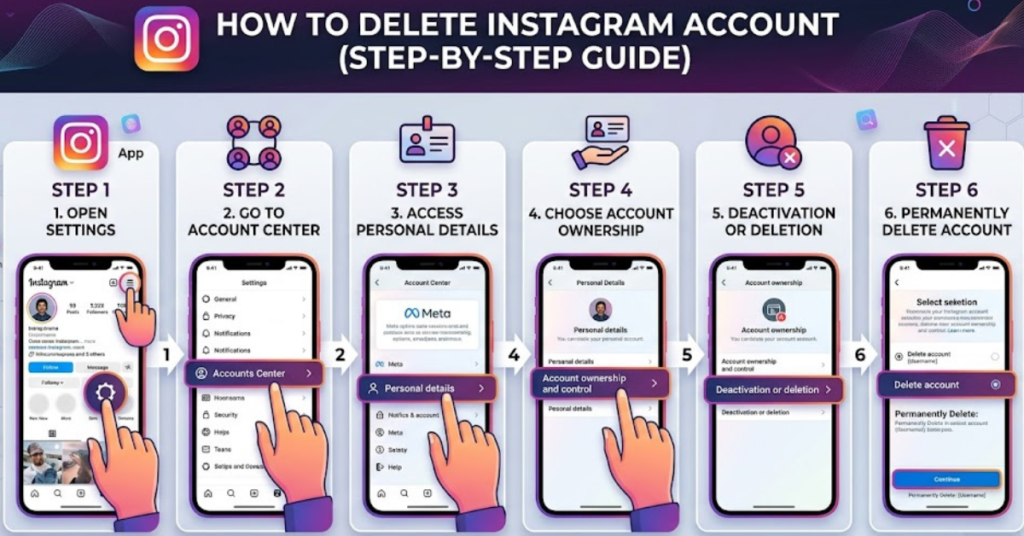
How to Delete Instagram Account Permanently
If you’re sure you want to remove everything, follow these steps carefully. This method works on desktop and mobile browsers.
Step-by-Step Instructions
- Go to Instagram’s Delete Account page (you must log in).
- Select a reason for deleting your account.
- Enter your password again.
- Click Delete [Your Username].
- Confirm by selecting OK.
Important: Instagram delays permanent deletion for 30 days. If you log back in during that time, your account will be restored.
How to Delete Instagram Account on Phone
If you’re using Android or mobile browser:
- Open your mobile browser (Chrome, Safari, etc.)
- Log in to Instagram
- Visit the Delete Account page
- Choose your reason
- Enter password
- Tap Delete Account
The Instagram app itself may redirect you to a browser — this is normal.
How to Delete Instagram Account on iPhone
Deleting Instagram on iPhone is similar but here’s the simplest way:
- Open Safari on your iPhone
- Go to Instagram and log in
- Access the Delete Account page
- Select reason for leaving
- Enter password
- Tap Delete
Your account will then be scheduled for permanent deletion.
How to Delete Instagram Messages
Want to remove chats without deleting your whole account? Here’s how:
Delete Individual Messages
- Open Instagram app
- Go to Messages (DMs)
- Open conversation
- Tap and hold message
- Select Unsend
Delete Entire Conversation
- Go to Messages
- Swipe left on conversation (iPhone)
- Tap Delete
Note: Deleting chats only removes them from your side.
How to Delete Instagram Comments
Removing a comment is quick:
- Open your post or someone else’s
- Tap Comments
- Swipe left (iPhone) or tap and hold (Android)
- Tap Delete icon
You can also delete multiple comments at once using Manage Comments.
How to Delete Instagram Accounts Multiple Accounts
If you manage more than one account:
- Go to Profile
- Tap Menu (☰)
- Tap Settings and privacy
- Scroll to Accounts Center
- Select the account you want
- Choose Delete Account
Repeat for each account.
Difference Between Deactivating and Deleting Instagram
Before you proceed, understand this key difference:
| Option | What Happens |
| Deactivate | Temporary, you can return anytime |
| Delete | Permanent, all data removed |
If you’re unsure, try deactivating first.
Tips Before You Delete Instagram
- Download your data first
- Inform close contacts
- Cancel linked services
- Remove third-party apps
To download data:
Settings → Accounts Center → Your Information → Download Data
FAQs About How to Delete Instagram
How long does it take to delete Instagram permanently?
Instagram waits 30 days before permanently deleting your account.
Can I recover my account after deleting it?
Only if you log back in within 30 days.
How to delete Instagram without password?
You must reset your password first. Deletion requires login.
How to delete Instagram account on phone permanently?
Use your phone browser and follow the permanent deletion steps listed above.
Will deleting Instagram remove messages?
Yes, once your account is deleted, all messages are permanently removed.
How to delete Instagram comments quickly?
Use Manage Comments to delete multiple comments at once.
Conclusion
Learning how to delete Instagram is simple once you know where to look. Whether you want to delete Instagram account permanently, remove messages, or clean up comments, the steps above cover everything.
Take a moment to decide whether you want to deactivate or delete, download your data, and then follow the guide. Once done, you’ll have full control over your digital presence.
If you’re considering a social media reset, this might be the perfect time to explore healthier online habits or start fresh with a new account.