
Posted a TikTok story you instantly regret? It happens to the best of us. The good news is that learning how to delete TikTok story content is quick and surprisingly simple. Whether you uploaded something by mistake or just changed your mind, TikTok gives you full control to remove it within seconds.
In this guide, you’ll discover exactly how to delete TikTok story on iPhone and Android, along with helpful tips, common issues, and answers to frequently asked questions.
What Is a TikTok Story?
Before jumping into the steps, it helps to understand what TikTok Stories are.
TikTok Stories are short, temporary posts that disappear after 24 hours—similar to Instagram or Snapchat stories. They appear on your profile and in followers’ feeds, allowing you to share quick updates without committing to a permanent post.
How to Delete TikTok Story Step-by-Step Guide
Removing a TikTok story takes only a few taps. Follow these steps:
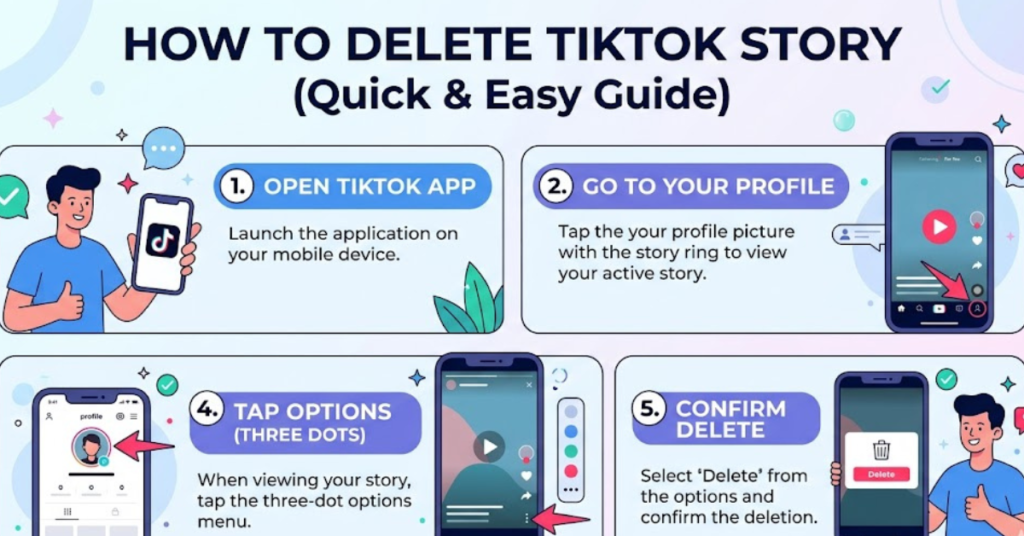
1. Open the TikTok App
Launch the TikTok app on your phone and log in to your account if you’re not already signed in.
2. Go to Your Profile
Tap the Profile icon in the bottom-right corner of your screen.
3. Open Your Story
Tap your profile picture to view your active TikTok story.
4. Tap the Three Dots (⋯)
While viewing your story, look for the three-dot menu or “More” option on the screen.
5. Select “Delete”
Tap Delete, then confirm your choice.
That’s it—your story is removed instantly.
How to Delete TikTok Story on iPhone
If you’re using an iPhone, the process is nearly identical, but here’s a clear breakdown:
- Open the TikTok app on your iPhone
- Tap your Profile
- Tap your active story
- Press the three dots (⋯) at the bottom
- Tap Delete and confirm
There’s no extra step for iOS users—the interface is clean and straightforward.
How to Delete TikTok Story on Android
Android users can follow the same process:
- Open TikTok
- Go to your profile
- Tap your story
- Select the three-dot menu
- Tap Delete
TikTok keeps the experience consistent across devices, so you won’t run into major differences.
What Happens After You Delete a TikTok Story?
Once you delete a story:
- It disappears immediately from your profile
- Followers can no longer view it
- There’s no recovery option (it’s permanently removed)
So, make sure you really want to delete it before confirming.
Common Issues When Deleting TikTok Stories
Sometimes, users run into small hiccups. Here are a few quick fixes:
Story Won’t Delete
- Restart the app
- Check your internet connection
- Update TikTok to the latest version
Can’t Find the Delete Option
- Make sure you’re viewing your own story
- Tap around the screen to reveal hidden options
App Glitch or Freeze
- Force close and reopen TikTok
- Clear cache (especially on Android)
Tips to Manage TikTok Stories Better
Instead of deleting stories later, you can avoid mistakes upfront:
- Preview before posting to catch errors
- Use privacy settings to control who sees your story
- Save drafts if you’re unsure about posting
- Post at the right time to maximize engagement
FAQs
1. Can I recover a deleted TikTok story?
No, once you delete a TikTok story, it cannot be recovered. You’ll need to upload it again if you still have the original content.
2. How long do TikTok stories last?
TikTok stories automatically disappear after 24 hours unless you delete them earlier.
3. Can I delete someone else’s TikTok story?
No, you can only delete stories that you’ve posted on your own account.
4. Why can’t I delete my TikTok story?
This is usually due to app glitches or connectivity issues. Try restarting the app or updating it.
5. Is deleting a TikTok story different on iPhone?
Not really. The steps for how to delete TikTok story on iPhone are almost identical to Android.
Conclusion
Knowing how to delete TikTok story posts gives you more control over your content and online presence. Whether you’re fixing a mistake or simply cleaning up your profile, the process is quick, easy, and works the same across devices—including when learning how to delete TikTok story on iPhone.