
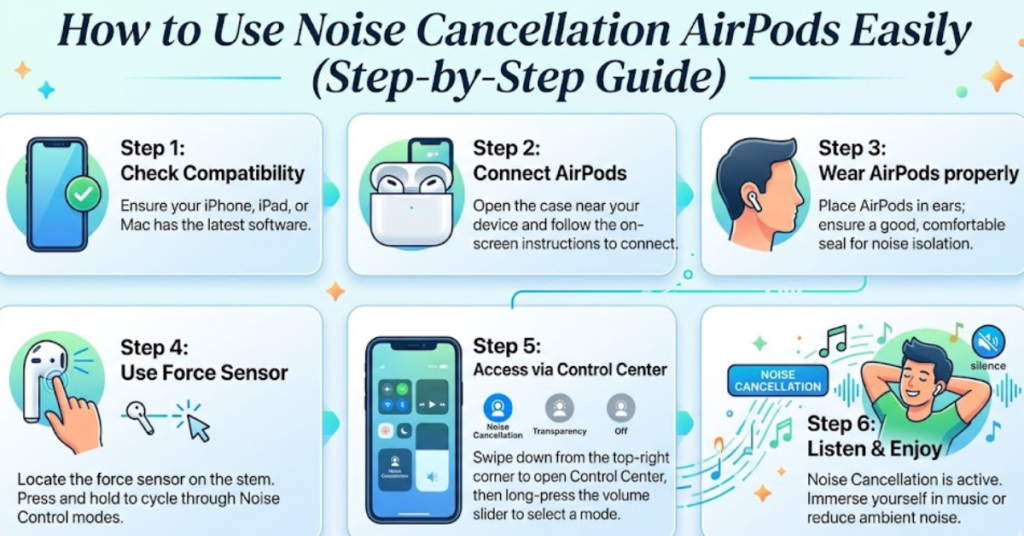

If you’ve ever been stuck in a noisy café, on a crowded bus, or trying to focus at home with distractions everywhere, you already know how valuable noise cancellation AirPods can be. The feature is a game-changer—but many people still don’t fully understand how to use noise cancellation AirPods properly to get the best sound experience.
In this guide, we’ll break it down in a simple, practical way so you can switch between modes, adjust settings, and enjoy crystal-clear audio anywhere.
What Is Noise Cancellation in AirPods?
Noise cancellation (often called Active Noise Cancellation or ANC) is a smart audio feature that uses built-in microphones to detect outside sounds and cancel them out in real time.
Instead of just playing louder music, your AirPods actually generate “anti-noise” to block background sounds like:
- Traffic noise
- Airplane engines
- Office chatter
- Wind or fan noise
This creates a quieter space so you can focus on music, calls, or podcasts without distractions.
Which AirPods Have Noise Cancellation?
Before learning how to use noise cancellation AirPods, it’s important to know that not all models support it.
AirPods with Active Noise Cancellation:
- AirPods Pro (1st and 2nd generation)
- AirPods Max
AirPods without ANC:
- Standard AirPods (1st, 2nd, and 3rd generation)
If you don’t see the noise control option, your model likely doesn’t support it.
How to Turn On Noise Cancellation on AirPods
There are several easy ways to activate noise cancellation depending on your device.
1. Using iPhone or iPad Control Center Method
This is the most common method:
- Connect your AirPods to your iPhone
- Swipe down from the top-right corner (Control Center)
- Press and hold the volume slider
- Tap Noise Control
- Select Noise Cancellation
You can also switch between:
- Noise Cancellation
- Transparency Mode
- Off
2. Using AirPods Stem AirPods Pro Only
This is a quick shortcut many people miss.
- Press and hold the force sensor on the AirPods stem
- You’ll hear a chime
- It switches between Noise Cancellation and Transparency Mode
You can customize this in Bluetooth settings if needed.
3. Using Settings App
If you prefer a more detailed setup:
- Go to Settings
- Tap Bluetooth
- Find your AirPods and tap the (i) icon
- Under Noise Control, select Noise Cancellation
How to Use Noise Cancellation AirPods Effectively
Knowing how to turn it on is just the beginning. To really get the most out of it, here are some practical tips.
Use It in the Right Environments
Noise cancellation works best in:
- Airplanes and trains
- Busy streets
- Offices or study spaces
- Cafés and public areas
It may feel less noticeable in very quiet rooms.
Combine It with Transparency Mode
AirPods also offer Transparency Mode, which lets outside sound in.
Switch to it when:
- You’re walking outside
- You need to hear announcements
- You’re talking to someone briefly
This balance helps you stay aware without removing your AirPods.
Keep Your AirPods Updated
Apple frequently improves noise cancellation through firmware updates. Make sure:
- Your iPhone is updated
- AirPods are charged and near your device
- Bluetooth is active for syncing updates
Ensure Proper Fit AirPods Pro
Noise cancellation works best when AirPods seal your ears properly.
Try:
- Different ear tips (small, medium, large)
- Testing the “Ear Tip Fit Test” in settings
A poor fit reduces noise blocking performance.
Common Problems and Fixes
Noise Cancellation Not Working?
Try these quick fixes:
- Reconnect AirPods
- Restart your iPhone
- Clean AirPods mesh gently
- Reset AirPods in Bluetooth settings
Sound Feels “Weird” or Pressure-Like
This is normal for some users when first using ANC. Your brain adjusts after a few minutes of use.
Benefits of Using Noise Cancellation AirPods
Using ANC regularly can improve your daily experience in several ways:
- Better focus during work or study
- Improved call clarity
- Less ear fatigue in noisy environments
- More immersive music experience
- Reduced need to increase volume
FAQs About Noise Cancellation AirPods
1. How do I know if my AirPods have noise cancellation?
Check your model. Only AirPods Pro and AirPods Max support ANC.
2. Can I use noise cancellation without music?
Yes, you can turn on ANC even without playing audio for a quiet environment.
3. Does noise cancellation drain battery faster?
Yes, ANC uses extra power, but the difference is usually small in normal use.
4. What’s the difference between Transparency Mode and Noise Cancellation?
Noise Cancellation blocks sound, while Transparency Mode lets outside sound in naturally.
5. Why is my noise cancellation weak?
It could be due to poor fit, dirty AirPods, or outdated firmware.
Conclusion
Learning how to use noise cancellation AirPods is simple, but using it the right way can completely change your listening experience. Whether you’re commuting, working, or relaxing, ANC helps you block distractions and enjoy pure, focused sound.
Once you get comfortable switching between Noise Cancellation and Transparency Mode, your AirPods become more than just earbuds—they turn into a powerful everyday audio tool.