

You’re in the middle of a call or your favorite song, and suddenly—silence. If you’ve been wondering why do my AirPods keep disconnecting, you’re not alone. This is one of the most common issues AirPods users face, whether they’re connected to an iPhone, laptop, or another device.
The good news? Most disconnection problems are easy to fix once you understand what’s causing them. In this guide, we’ll break down the real reasons behind the issue and show you practical solutions that actually work.
Why Do My AirPods Keep Disconnecting? Common Causes
AirPods rely on Bluetooth, battery health, and software stability. When any of these slip, connection problems start showing up.
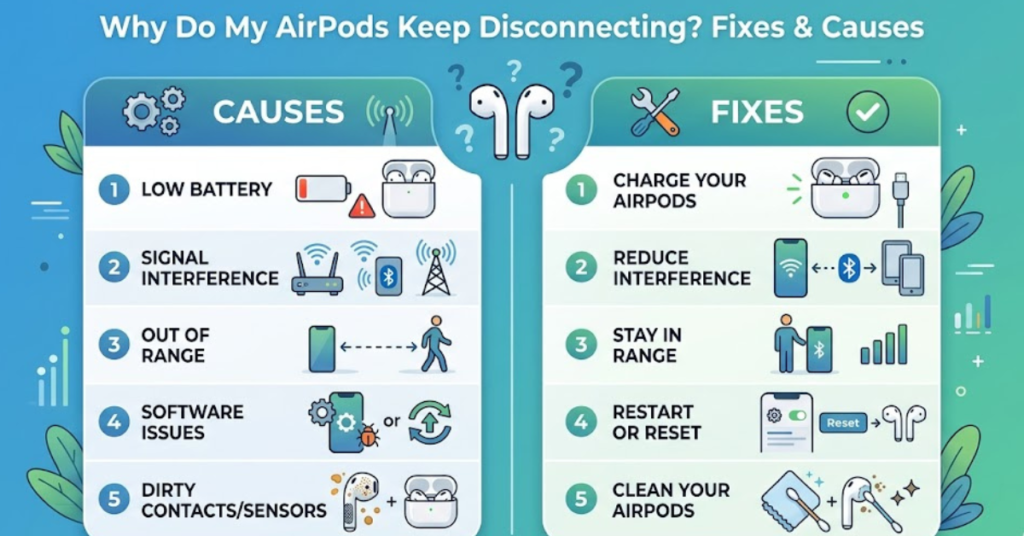
1. Low Battery Levels
This might sound obvious, but it’s often overlooked. AirPods with low battery can disconnect randomly or fail to maintain a stable connection.
Signs to watch for:
- One AirPod disconnects before the other
- Frequent reconnecting sounds
- Sudden audio cut-outs
Quick fix:
Charge both AirPods and the case fully, then reconnect.
2. Bluetooth Interference
Bluetooth signals can be disrupted by other wireless devices or physical obstacles.
Common interference sources:
- Wi-Fi routers
- Other Bluetooth devices nearby
- Thick walls or metal surfaces
Solution:
- Keep your device within 10 meters
- Turn off unused Bluetooth devices
- Avoid crowded wireless environments
3. Software Glitches or Outdated Firmware
If you’re asking why do my AirPods keep disconnecting and reconnecting, software bugs are often the culprit.
Fix it by:
- Updating your iPhone, iPad, or laptop
- Ensuring AirPods firmware is up to date (automatic when connected to iPhone)
- Restarting your device
Why Do My AirPods Keep Disconnecting from My iPhone?
This is one of the most searched variations of the issue—and for good reason.
Automatic Device Switching Issues
Apple’s ecosystem allows AirPods to switch between devices automatically. Sometimes, this feature causes unexpected disconnections.
Fix:
- Go to Settings > Bluetooth
- Tap the “i” next to your AirPods
- Select Connect to This iPhone
- Choose When Last Connected to This iPhone
iOS Bugs or Settings Conflicts
Occasionally, iOS updates introduce minor bugs that affect Bluetooth.
Try this:
- Reset network settings (Settings > General > Reset > Network Settings)
- Toggle Bluetooth off and on
Why Do My AirPods Keep Disconnecting from My Laptop?
Whether you’re using Windows or macOS, connection stability can vary.
Bluetooth Driver Issues Windows
Outdated or faulty drivers are a major reason why do my AirPods keep disconnecting from my laptop.
Fix:
- Update Bluetooth drivers via Device Manager
- Remove and re-pair your AirPods
macOS Bluetooth Conflicts
Mac users may experience issues due to system-level conflicts.
Solutions:
- Reset Bluetooth module (Shift + Option + Click Bluetooth icon)
- Remove AirPods and reconnect
Why Do My AirPods Keep Disconnecting from My Phone Android & Others?
AirPods work with non-Apple devices, but not perfectly.
Compatibility Limitations
AirPods are optimized for Apple devices, so features like automatic switching may not work properly on Android.
Fix:
- Use third-party apps for better control
- Keep Bluetooth settings simple (avoid multiple connections)
Why Do My AirPods Keep Disconnecting and Reconnecting?
This specific issue usually points to unstable connections.
Loose Bluetooth Pairing
Corrupted pairing data can cause constant reconnecting loops.
Fix Reset AirPods:
- Put AirPods in the case
- Press and hold the setup button until the light flashes amber
- Reconnect to your device
Hardware Issues
If none of the software fixes work, hardware might be the problem.
Possible causes:
- Damaged AirPods
- Faulty charging case
- Worn-out battery
Quick Troubleshooting Checklist
If you want a fast solution, try this sequence:
- Charge AirPods fully
- Turn Bluetooth off and on
- Restart your device
- Forget and reconnect AirPods
- Reset network settings
- Update software/firmware
FAQs
Why do my AirPods keep disconnecting randomly?
Random disconnections are usually caused by low battery, Bluetooth interference, or outdated software.
Why do my AirPods keep disconnecting from my iPhone during calls?
This can happen due to weak Bluetooth signals, background apps, or iOS glitches. Resetting network settings often helps.
Why do my AirPods keep disconnecting from my laptop on Windows 10/11?
Most often, it’s due to outdated Bluetooth drivers or power-saving settings. Updating drivers usually fixes it.
Why do my AirPods keep disconnecting even when fully charged?
If battery isn’t the issue, it’s likely interference, software bugs, or pairing problems. Try resetting your AirPods.
Can damaged AirPods cause disconnection issues?
Yes. Physical damage or battery wear can lead to unstable connections and frequent dropouts.
Conclusion
If you’ve been stuck asking why do my AirPods keep disconnecting, the answer usually comes down to a mix of battery health, Bluetooth stability, and software performance. Thankfully, most issues can be resolved in minutes with simple fixes like resetting your AirPods or updating your device.
Start with the basics—charge, reconnect, and update—then move to deeper fixes if needed. If problems persist, it may be time to check for hardware issues or consider a replacement.